What is Email Encryption and How Does it Work?

 8th January, 2026
 13 min read
 You probably send dozens of emails every day. Contracts. Login details. Bank information. Personal conversations. It feels routine. Type. Attach. Send. Done.
But here’s what most people don’t see. An email doesn’t travel in a straight line from you to the recipient. It hops across servers and networks before landing in the right inbox. Without protection, parts of that journey can be exposed.
That’s why Email Encryption matters. It quietly locks your message before it leaves your device. Even if someone intercepts it along the way, all they see is scrambled code.
If you’ve ever wondered whether your emails are truly private, you’re not overthinking it. You’re asking the right question. Let’s break down how this protection works and why it’s become essential in modern communication.
What is Email Encryption in Simple Terms?
Let’s strip away the technical language.
Email Encryption is a way of locking your email so only the intended person can read it. Instead of sending plain, readable text, your message is converted into coded data. To anyone without the proper key, it looks like random characters.
Think of it like putting your letter inside a locked safe instead of sending it on a postcard. A postcard can be read by anyone who handles it. A locked safe cannot be opened without the right combination.
When you use Email Encryption, the message body and sometimes the attachments are scrambled before they leave your device. The recipient uses a special digital key to unlock and read the original content.
In simple terms, it turns your private message into something unreadable during its journey, then restores it once it reaches the right person.
Why Email Needs Protection?
Email feels private because it lands in a personal inbox. But the path it takes to get there is not always private. Messages move across multiple servers and networks before reaching the recipient. Without protection, that journey creates exposure points.
Cybercriminals know this. Email is one of the most targeted communication channels because it carries valuable information. Contracts. Financial details. Login credentials. Personal identifiers. One compromised message can open the door to something much bigger.
Email Encryption reduces that risk. It ensures that even if a message is intercepted, the content remains unreadable. Instead of plain text, attackers see scrambled data they cannot use.
There is also a trust factor. Clients and partners assume their conversations are handled responsibly. Secure messaging shows that privacy is not an afterthought. It is part of how you operate.
In short, email needs protection because it carries sensitive information through environments you do not fully control. Encryption turns that vulnerability into controlled access.
How Email Encryption Works Behind the Scenes?
On the surface, sending an encrypted message looks no different from sending a regular one. You type, attach files, and click send. The real work happens quietly in the background.
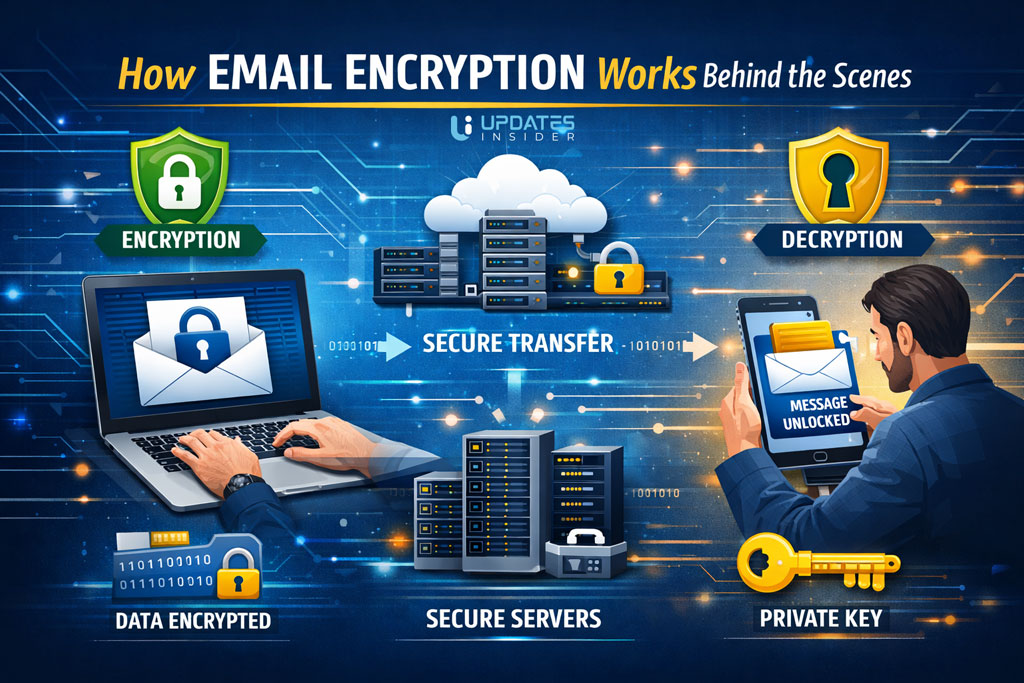
When Email Encryption is active, your message is processed through a cryptographic algorithm before it leaves your device. That algorithm converts readable text, called plain text, into scrambled data known as ciphertext. To anyone intercepting it, the message looks like random characters.
The key is what makes this possible. In modern systems, encryption often uses two keys. A public key locks the message. A private key unlocks it. You can share your public key openly, but the private key stays with the recipient.
Think of it like a mailbox with a slot and a locked door. Anyone can drop a letter in using the slot. Only the person with the key can open the box and read what’s inside.
Email Encryption works on that same principle. It allows messages to travel across networks safely, because even if someone grabs the data mid route, they cannot decode it without the correct key.
Types of Email Encryption
Not all Email Encryption works the same way. The level of protection depends on when the message is secured and who holds the keys. Let’s break this into clear, practical categories.
1. Encryption in Transit
This protects your message while it travels between mail servers. It is commonly powered by TLS, which creates a secure connection during delivery.
Think of it as sending your email through a protected tunnel instead of an open road. If someone tries to intercept it mid route, they see scrambled data.
Most major providers enable this layer automatically. It is essential, but it mainly protects the journey, not necessarily the message after it reaches the inbox.
2. End to End Encryption
This is a stronger and more private form of Email Encryption. The message is locked on the sender’s device and remains encrypted until the recipient opens it.
Even the email provider cannot read the content. Only the person with the correct private key can unlock it.
This method is ideal for confidential documents, legal communication, and sensitive business data.
3. Encryption at Rest
This protects emails stored on servers. If someone gains unauthorized access to the storage system, the saved messages remain unreadable without proper authorization.
While it does not secure the entire delivery path on its own, it adds another protective layer once the email has arrived.
Strong Email Encryption strategies often combine these types. Protection during travel. Protection during storage. And, when needed, protection from everyone except the intended recipient.
End to End Encryption Explained
End to end protection is often considered the gold standard of Email Encryption. It focuses on one simple promise. Only the sender and the intended recipient can read the message. No one else in between.
Here’s how it works in practical terms.
When you send a message using end to end Email Encryption, it is locked on your device before it leaves. The content is scrambled using the recipient’s public key. Once it begins its journey across the internet, it remains unreadable the entire time.
When the message reaches the recipient, their private key unlocks it. That private key is stored securely and never shared. Without it, the message stays in coded form.
Even the email provider cannot see the contents. They can deliver the message, but they cannot open it.
Think of it like placing your letter in a locked briefcase and handing the only key directly to the recipient ahead of time. The courier carries the briefcase, but has no way to open it.
This is why end to end Email Encryption is preferred for legal documents, financial data, medical information, and confidential business communication. It minimizes trust in intermediaries and keeps control between the two parties who matter most.
Encryption in Transit vs Encryption at Rest
When people talk about Email Encryption, they often mix these two up. The difference is simple. One protects your message while it’s moving. The other protects it while it’s stored. Strong security usually includes both.
Encryption in Transit
This type of Email Encryption secures your message as it travels across the internet. When you hit send, your email doesn’t go straight to the recipient. It passes through multiple servers along the way.
Encryption in transit creates a secure connection between those servers. It’s like sending your message through a guarded tunnel instead of across an open field. Anyone trying to intercept it during that journey sees unreadable data.
Most modern providers use TLS for this layer. It’s widely adopted and often enabled by default.
Encryption at Rest
This protects your email after it has been delivered and stored on a server. If someone gains unauthorized access to that server, encrypted data remains unreadable without the proper credentials.
Think of it as locking your files inside a secure vault once they arrive. Even if someone gets into the building, they still can’t open the safe.
On its own, encryption at rest does not secure the transmission path. And encryption in transit does not fully protect stored data.
A solid Email Encryption strategy covers both movement and storage. Protection while traveling. Protection while sitting still.
Common Email Encryption Protocols
When people hear Email Encryption, they often imagine a single tool doing all the work. In reality, it runs on established security protocols working quietly in the background. Here are the most common ones you’ll encounter.
TLS
Transport Layer Security, or TLS, protects emails while they move between mail servers. It creates a secure connection so the data cannot be easily intercepted during transit.
Think of TLS as a protected delivery route. Your message travels through a secure channel instead of an exposed network path. Most major providers enable TLS by default.
It is widely used and essential, but it mainly secures the journey, not necessarily the message content itself once delivered.
S MIME
S MIME stands for Secure Multipurpose Internet Mail Extensions. It uses digital certificates to encrypt and digitally sign messages.
With this method, Email Encryption relies on a public and private key pair. The sender encrypts the message using the recipient’s public key. The recipient decrypts it using their private key.
S MIME is common in corporate and enterprise environments where verified identity matters.
PGP
Pretty Good Privacy, known as PGP, also uses public key cryptography. It allows users to encrypt email content and verify authenticity through digital signatures.
PGP is often favored by individuals and organizations that want strong end to end Email Encryption without relying heavily on centralized authorities.
Each of these protocols serves a specific purpose. TLS secures the connection. S MIME and PGP secure the content itself. Together, they form the backbone of modern secure email communication.
Benefits for Businesses and Individuals
Email feels routine, but the information inside it is often anything but ordinary. Contracts, invoices, health records, passwords, strategy discussions. That’s where Email Encryption delivers real value.
For Businesses
For companies, secure communication is not optional. It protects intellectual property, customer data, and internal planning. One exposed thread can damage reputation and trigger compliance issues.
Email Encryption reduces that exposure by locking message content before it moves across networks. Even if intercepted, the data is unreadable.
It also supports regulatory requirements in industries like finance, healthcare, and legal services. Secure messaging is often part of demonstrating due diligence. Beyond compliance, it builds trust. Clients feel more confident when they know their information is handled carefully.
For Individuals
Individuals benefit just as much. Personal emails often contain bank details, identification documents, travel plans, and private conversations. Those details are valuable to attackers.
Email Encryption adds a protective layer that keeps sensitive content from being casually accessed or exploited. It is a quiet safeguard that works in the background.
In simple terms, encryption turns ordinary email into protected communication. For businesses, it preserves credibility and compliance. For individuals, it protects privacy in a digital world that rarely slows down.
Limitations and Misconceptions
Email Encryption is powerful. But it is not a magic shield that solves every security problem. Understanding its limits helps you use it wisely.
First, encryption protects the message content, not careless behavior. If someone falls for a phishing email and gives away their password, encryption cannot undo that mistake. Security still depends on strong passwords, multi factor authentication, and basic awareness.
Second, if a device is compromised, decrypted messages can still be accessed. Once an email is opened on an infected computer, the protection no longer helps. Email Encryption secures the journey and storage, but endpoint security matters just as much.
Another common misconception is that encryption is automatic everywhere. Some providers use transport level security by default, but true end to end Email Encryption may require setup, certificates, or key exchange. It does not always activate by itself.
People also assume encrypted email is complicated or only for large enterprises. Modern platforms have made it far more accessible. In many cases, enabling secure messaging is a matter of turning on the right setting.
The real takeaway is this. Email Encryption significantly reduces risk, but it works best as part of a broader security strategy. Technology protects the message. Good practices protect the user.
How to Enable Email Encryption?
Turning on Email Encryption is usually easier than people expect. The exact steps depend on your provider, but the path follows the same logic.
First, check what your email service already supports. Most modern platforms automatically use TLS to secure messages in transit. That means your emails are protected while moving between servers. This layer is often enabled by default.
If you need stronger protection, look for built in encryption settings in your email dashboard. Some services let you toggle encryption before sending a message. Others allow administrators to enforce encrypted delivery across the organization.
For end to end Email Encryption, you may need digital certificates or public and private key pairs. In business environments, IT teams typically manage this setup. Individuals using PGP or S MIME must generate keys and share their public key with contacts.
It also helps to enable multi factor authentication. While not technically encryption, it strengthens account security and prevents unauthorized access to encrypted messages.
The key is understanding your risk level. Basic transport security may be enough for everyday communication. For contracts, financial data, or confidential documents, stronger Email Encryption settings are worth activating.
Final Takeaway
Email feels simple. Type a message. Attach a file. Hit send. But under the surface, that message travels across networks you do not control. That is where risk lives.
Email Encryption changes that equation. It locks your content before it leaves your hands and ensures only the intended recipient can unlock it. Instead of trusting every stop along the way, you rely on mathematics and secure keys.
For businesses, this means protecting client trust and meeting compliance expectations. For individuals, it means keeping personal data private in a world where inboxes are frequent targets.
The bigger picture is this. Email Encryption is not about paranoia. It is about responsibility. When sensitive information moves digitally, protection should move with it.
FAQs
Is Email Encryption necessary for everyday users?
If you only send casual messages, basic transport security may be enough. But if you share financial details, identification documents, or private conversations, Email Encryption adds an important layer of protection. It reduces the risk of interception and misuse.
Does Email Encryption slow down delivery?
In most modern systems, the process happens almost instantly. The encryption and decryption occur in the background, so users rarely notice any delay. Security does not have to mean inconvenience.
Can encrypted emails be forwarded?
It depends on the type of Email Encryption used. With transport level security, forwarded messages may not stay encrypted. With end to end protection, forwarding can be restricted or may require the new recipient to have proper keys.
Do both sender and recipient need special setup?
For basic server level encryption, no special setup is required on either side. For end to end Email Encryption, both parties usually need compatible systems and exchanged public keys.
Is Email Encryption the same as password protecting an attachment?
Not exactly. Password protecting a file secures that specific document. Email Encryption secures the entire message, including attachments, during transit and sometimes while stored. It is broader and more integrated.
Can my email provider read encrypted messages?
With standard transport encryption, providers may still access stored content. With true end to end Email Encryption, even the provider cannot read the message because only the recipient holds the private key.