How to Increase Email Deliverability Rate (Expert Tips)

 1st March, 2026
 9 min read
 Here’s something most marketers find out the hard way. Sending an email and delivering an email are two completely different things. You can have a great subject line, a well-designed template, and a list of real people, and still end up in the spam folder. That’s the gap nobody warns you about.
Email deliverability is the measure of whether your email actually reaches the inbox. Not the outbox. Not the promotions tab. The inbox. And if your open rates have been quietly dropping, it’s worth asking whether your emails are even getting there in the first place. How to improve email deliverability?
The good news is that most deliverability problems are fixable. They’re not random. They follow patterns, and once you understand what inbox providers are looking for, you can start working with them instead of against them.
What Email Deliverability Actually Means?
People confuse delivery rate with deliverability. Delivery rate just means the email wasn’t bounced back. Deliverability goes further it asks whether the email landed where it was supposed to land.
Think of it like mailing a letter. A high delivery rate means it reached the building. Good deliverability means it reached the right desk, not the trash can in the hallway.
Gmail, Outlook, Yahoo they all run your email through a scoring system before deciding where it goes. That score is built from your domain reputation, sending history, engagement patterns, and technical setup. Every campaign you send either builds that score or chips away at it.
To genuinely improve email deliverability, you need to understand what’s feeding that score and what’s silently hurting it.
Why Emails End Up in Spam?
Before fixing anything, it helps to know what’s actually broken. Here are the most common reasons emails miss the inbox.
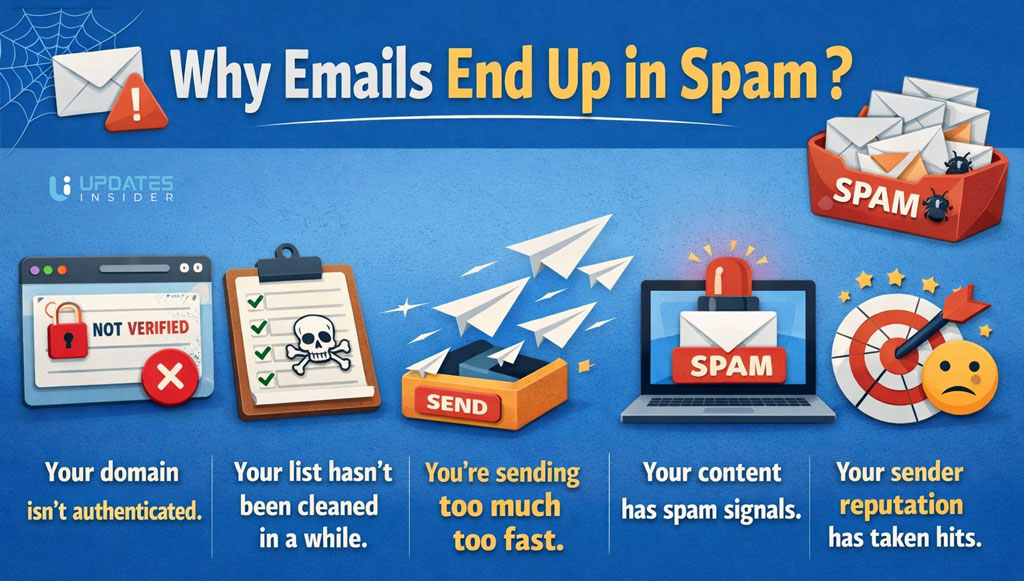
Your domain isn’t authenticated. If you haven’t set up SPF, DKIM, and DMARC records, inbox providers have no way to verify you are who you say you are. It’s like sending a letter with no return address. Suspicious by default.
Your list hasn’t been cleaned in a while. Old addresses, typos, and inactive contacts drag your engagement metrics down. Low engagement signals tell providers your emails aren’t wanted even if they are.
You’re sending too much too fast. A new domain blasting 50,000 emails on day one looks like a red flag, not a business.
Your content has spam signals. ALL CAPS subject lines, too many images and not enough text, broken links, or too many exclamation marks all raise flags.
Your sender reputation has taken hits. High bounce rates, spam complaints, and low open rates all quietly damage the reputation of your sending domain over time.
How to Improve Email Deliverability Rate?
1. Set Up Domain Authentication (SPF, DKIM, DMARC)
This is non-negotiable. These three records tell inbox providers that your emails are genuinely coming from your domain and not from someone spoofing it.
SPF (Sender Policy Framework) lists the servers authorized to send email from your domain. DKIM (DomainKeys Identified Mail) adds a digital signature to every email you send. DMARC ties both together and tells providers what to do when something doesn’t match.
Without these in place, even legitimate emails look suspicious. Setting them up is a one-time technical task that pays off permanently. Most email platforms walk you through it step by step.
2. Clean Your Email List Regularly
A bloated list full of dead addresses is one of the fastest ways to hurt your sender reputation. Every hard bounce, every undeliverable address, every contact who hasn’t opened an email in 18 months they’re all dragging your engagement rate down.
Run a re-engagement campaign for inactive subscribers before removing them. Give people a real reason to stay on your list. If they don’t engage, let them go. A smaller, engaged list will always outperform a large, unresponsive one in terms of inbox placement.
Use an email verification tool before importing new lists. Tools like NeverBounce, ZeroBounce, or built-in verification features in your ESP can filter invalid addresses before they do damage.
This single habit keeping your list clean does more to improve email deliverability than almost anything else.
3. Warm Up Your Sending Domain
If you’re using a new domain or a new IP address, don’t start by sending to your entire list. Inbox providers don’t trust new senders by default. You have to earn that trust gradually.
Start with your most engaged contacts people who know your brand, have opted in recently, and are likely to open. Send small volumes first (a few hundred), then scale up over several weeks. Track your engagement at each stage.
There are tools like Mailwarm and Lemwarm that automate this process. They send emails between real accounts and simulate genuine engagement, which helps build your sender reputation from the ground up.
4. Monitor Your Sender Reputation Score
Your sender reputation is essentially your credit score for email. It’s assigned to your sending domain and IP address, and inbox providers check it every time you send.
You can check your domain reputation using Google Postmaster Tools (free), MXToolbox, or Sender Score by Validity. These tools show you how inbox providers perceive your domain and flag any issues before they become serious problems.
If your score drops, look at recent bounce rates, complaint rates, and whether any of your emails have been flagged as spam. A sudden spike in complaints after a single campaign is often the culprit.
Staying on top of this is part of what it means to truly improve email deliverability over time not just fix it once and forget it.
5. Avoid Spam Trigger Words and Sloppy Formatting
Subject lines and email body copy both get scanned by spam filters. Certain words and patterns flag your email before a human ever sees it.
Words like “FREE!!!”, “Act Now”, “Guaranteed”, “No risk”, and “Click here” have historically high spam associations. It’s not that you can never use them it’s that using several of them together, paired with all-caps or excessive punctuation, builds up a spam score fast.
On the formatting side, keep your image-to-text ratio balanced. Emails that are mostly one big image with very little text are a classic spam pattern. Include a plain-text version of every email. Make sure all links work and point to legitimate pages.
6. Use a Dedicated Sending IP (When Volume Justifies It)
If you’re sharing an IP with thousands of other senders, their behavior affects your reputation. One bad actor on a shared IP can tank deliverability for everyone on it.
For businesses sending over 50,000–100,000 emails per month, a dedicated IP starts to make sense. You control your reputation entirely because you’re the only sender on that address.
Below that volume, a shared IP from a reputable ESP is usually fine and actually better, because shared IPs on major platforms have high established trust.
7. Watch Bounce Rates and Engagement Signals
Hard bounces (invalid addresses) should stay below 2%. Soft bounces (temporary failures) are less critical but still worth monitoring. Spam complaint rates should stay below 0.1%.
Engagement matters too. When people open, click, and reply to your emails, it signals to inbox providers that your content is wanted. When they ignore or delete without opening, it signals the opposite.
Segment your list by engagement level. Send your best content to your most active subscribers first. Use that positive engagement signal to strengthen your sender reputation before reaching out to colder segments.
Email Content That Helps Your Deliverability
Deliverability isn’t only a technical problem. Content plays a bigger role than most people realize.
Write emails that are genuinely useful to the people receiving them. Relevant, personalized content gets opened. Opened emails signal positive engagement. Positive engagement strengthens your reputation.
Keep your sending frequency consistent. Sending once a week and then suddenly blasting five emails in three days looks irregular and generates more complaints.
Always include a clear, working unsubscribe link. This isn’t just legal compliance (CAN-SPAM, GDPR) — it’s also a deliverability signal. When someone can’t find the unsubscribe button, they hit the spam button instead. That’s far worse for you.
Tools Worth Using
Google Postmaster Tools — Free. Shows your domain reputation and spam rate directly from Gmail’s perspective.
Mail Tester — Paste in an email address, send a test, and get a spam score with detailed feedback.
MXToolbox — Check blacklists, DNS records, and email health in one place.
GlockApps or Litmus — Run inbox placement tests across major providers before sending to your real list.
ZeroBounce or NeverBounce — Email list verification and cleaning.
Common Mistakes That Kill Deliverability
Buying email lists. Always a bad idea. Those people never opted in to hear from you, complaint rates are high, and you’re essentially starting with a damaged reputation.
Ignoring authentication setup. It takes an hour to configure properly. The cost of skipping it is months of poor inbox placement.
Never testing before sending. A quick spam score check before every campaign catches problems before they cost you.
Treating deliverability as a one-time fix. It’s an ongoing process. Your reputation changes with every campaign you send.
Quick Wins Checklist
- SPF, DKIM, and DMARC records configured
- Email list verified and cleaned in the last 90 days
- Sender reputation checked via Google Postmaster Tools or Sender Score
- Spam trigger words removed from subject lines and body copy
- Working unsubscribe link in every email
- Plain-text version included
- Bounce rate below 2%, complaint rate below 0.1%
- Sending from a warmed-up domain
The Bottom Line
Better email deliverability doesn’t happen from one tweak. It’s the result of consistent habits clean lists, proper authentication, relevant content, and paying attention to what your data is telling you.
The inbox is competitive. But if you’re doing the fundamentals right, you’re already ahead of most senders. Start with authentication if you haven’t. Clean your list next. Then build from there.
Every email you send is either building your reputation or spending it. Make them count.