SPF DKIM DMARC Explained for Non Technical Users

 28th February, 2026
 14 min read
 You send an important email. Maybe it is a newsletter from your blog, an update to your customers, or a message from your company domain. You hit send and expect it to land neatly in someone’s inbox.
But sometimes it doesn’t.
Instead, the message quietly disappears into the spam folder. Worse, someone else might receive a fake email that looks like it came from you. Same domain. Same name. Completely different sender.
This is one of the biggest hidden problems behind email today. Anyone on the internet can try to pretend they are sending messages from your domain. Email providers like Gmail and Outlook know this risk, so they run strict checks before trusting a message.
That is where SPF DKIM DMARC comes in.
Think of these as a set of security checks that prove an email truly came from the domain it claims. They help inbox providers answer a simple question before delivering any message.
Can this sender be trusted?
The good news is that these systems are not as complicated as they sound. Behind the technical names is a surprisingly simple idea. One system checks who is allowed to send emails. Another verifies the message has not been altered. The last one tells email servers what to do if something fails.
Once you see how they work together, the whole system starts to make sense.
In this guide, we will walk through everything in plain language. No technical jargon. Just clear explanations, simple analogies, and practical insight so you understand what is happening behind the scenes every time an email is sent.
The Hidden Problem Behind Email
Email feels simple on the surface. You write a message, click send, and it travels across the internet to someone else’s inbox. Most of us never think about what happens in between.
Here is the catch. Email was never originally built with strong identity checks. In the early days of the internet, systems trusted that people were honest about who they were. That worked when the internet was small. It does not work anymore.
Today, scammers often send messages pretending to be someone else. They might use the name of a company, a bank, or even your own website domain. To the person receiving the message, it can look completely real. This trick is called email spoofing, and it is one of the most common ways phishing attacks begin.
Now imagine you run a blog or business that sends newsletters. If attackers start impersonating your domain, two problems appear quickly. First, people may lose trust in your emails. Second, inbox providers become cautious and start filtering your legitimate messages into spam.
This is why email platforms like Gmail, Outlook, and Yahoo do not simply trust every message they receive. Instead, they run background checks before delivering it.
Those checks rely on a small set of verification systems that confirm the sender is genuine and the message has not been altered. Together, they form the backbone of modern email authentication.
Understanding SPF DKIM DMARC helps reveal how those checks work and why they matter for anyone sending email from their own domain.
Meet the Three Email Security Guards
Imagine your domain is a building that sends out thousands of letters every day. Customers, readers, and subscribers are waiting to receive them. But before any letter leaves the building, three security guards check it.
Each guard has a different job.
One guard checks who is allowed to send the letter. Another confirms the letter has not been altered along the way. The third decides what should happen if something looks suspicious.
This is a simple way to understand how SPF DKIM DMARC work behind the scenes.
The first system acts like an approved sender list. It tells email providers which servers are officially allowed to send emails from your domain. If a message comes from somewhere outside that list, the receiving server immediately becomes cautious.
The second system adds a digital signature to every email. Think of it like sealing a letter with a special stamp that only your domain can create. When the message arrives, the receiving server checks that stamp to confirm nothing inside the email was changed during delivery.
The third system connects everything together. It tells inbox providers what action to take if a message fails those checks. Sometimes it allows the email, sometimes it moves it to spam, and sometimes it rejects the message completely.
Individually, each guard does a specific task. Together, they create a stronger system that protects both senders and recipients from impersonation and tampered messages.
What SPF Actually Does?
Imagine you run a company and only a few trusted employees are allowed to send official letters on behalf of the business. Anyone outside that list should not be able to do it.
That is exactly the idea behind SPF DKIM DMARC, and the first part of this system focuses on controlling who can send emails from your domain.
SPF works like an approved sender list. Inside your domain’s DNS settings, you publish a record that tells the internet which mail servers are allowed to send messages using your domain name. Email providers read this record before accepting a message.
Here is how it plays out in a simple scenario.
Suppose your website sends newsletters through a service like a marketing platform. When that service sends an email from your domain, the receiving server checks your domain’s SPF record. If the server is on the approved list, the message passes the check and continues toward the inbox.
But if someone tries to send a fake message pretending to be your domain from an unknown server, the check fails. The receiving email provider immediately treats that message with suspicion.
In simple terms, SPF answers one key question.
Is this server allowed to send email for this domain?
By defining that list clearly, domain owners reduce the chances of attackers impersonating them. It also helps inbox providers trust legitimate emails, which improves the chances that your messages reach the inbox instead of the spam folder.
What DKIM Actually Does?
Now imagine you send a letter and seal it with a unique wax stamp. Anyone receiving that letter can check the seal. If it is intact, they know two things. The letter truly came from you, and nothing inside was changed during delivery.
That is the idea behind the second layer in SPF DKIM DMARC.
DKIM adds a digital signature to every email sent from your domain. This signature is created using a private cryptographic key that only your sending system has access to. At the same time, a matching public key is published in your domain’s DNS records.
When the email reaches the receiving server, the system retrieves the public key and uses it to verify the signature attached to the message.
If the signature matches, the email passes the check. That means the message genuinely came from the domain that signed it and the content remained untouched while traveling across the internet.
If someone tried to modify the email on the way, even a small change would break the signature. The receiving server would immediately know the message was tampered with.
In simple terms, DKIM answers a different question than SPF.
Did this message really come from this domain, and has it remained unchanged?
By signing emails with this digital seal, domain owners give inbox providers a reliable way to verify authenticity. This builds trust with email platforms and helps legitimate messages reach their destination safely.
What DMARC Actually Does?
So far we have looked at two different checks. One confirms the sending server is approved. The other verifies the message was not altered.
Now imagine a security manager standing above those two guards. Their job is simple. Decide what should happen when something goes wrong.
That role is handled by SPF DKIM DMARC, and the final layer acts like a rulebook for email providers.
DMARC tells receiving mail servers how to respond when authentication checks fail. Without this guidance, email platforms might handle suspicious messages differently. Some might allow them through, others might move them to spam, and some might block them completely.
With DMARC in place, the domain owner sets a clear policy.
For example, you can instruct email providers to do one of three things. They can monitor and report suspicious emails, send failing messages to spam, or reject them entirely before they reach the inbox.
Another powerful feature is reporting. DMARC sends feedback reports back to the domain owner, showing which servers are sending emails using the domain. This visibility helps identify misconfigured systems or possible impersonation attempts.
In simple terms, SPF verifies the sender, DKIM protects the message, and DMARC decides what happens if something looks suspicious.
Together, they create a coordinated system that helps email providers trust legitimate messages while blocking fraudulent ones.
How These Three Work Together?
Individually, each system checks something important. But the real strength appears when they operate together during the journey of an email.
Let’s walk through what happens behind the scenes.
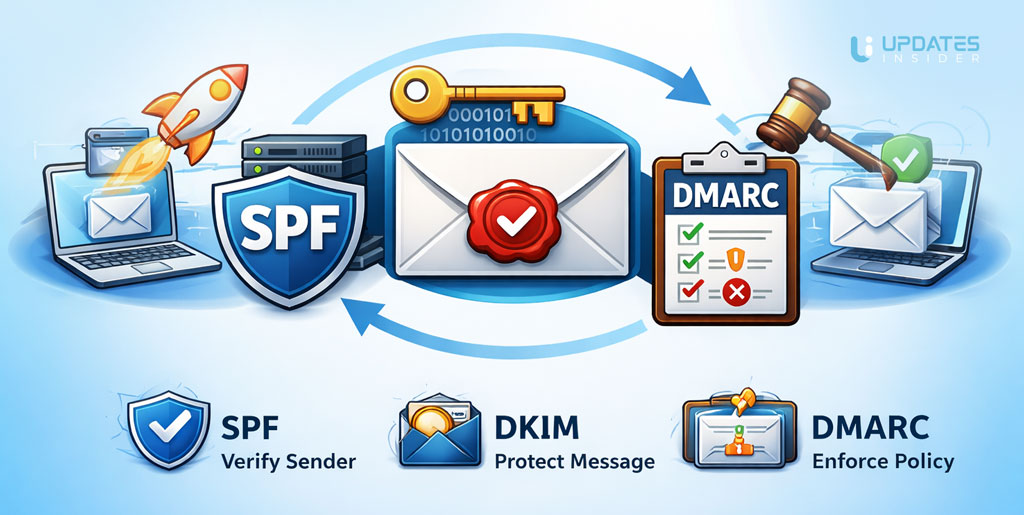
Imagine you send a newsletter from your domain. The message leaves your email service and travels across the internet toward the recipient’s mail server. Before that message reaches the inbox, the receiving system quietly runs a few checks.
First, the server looks at the sending source. It checks your domain’s SPF record to confirm that the server sending the message is allowed to do so. If the server appears on the approved list, the first check passes.
Next comes the signature verification. The email carries a digital signature created when the message was sent. The receiving server retrieves the public key from your domain’s DNS and verifies that signature. If the message content has remained untouched during delivery, the verification succeeds.
Now the final decision step happens through SPF DKIM DMARC. The receiving server evaluates the results of the previous checks and follows the policy defined by the domain owner. Depending on the rules, the email may be accepted, filtered, or rejected.
All of this takes place in seconds. The recipient never sees it happening.
What this really means is simple. One system confirms the sender. Another protects the integrity of the message. The final layer enforces the rules.
Together, they create a trusted path that helps legitimate emails reach inboxes while blocking messages that try to impersonate your domain.
Why This Matters for Bloggers, Businesses, and Creators?
If you send emails from your own domain, authentication is no longer optional. It plays a direct role in whether your messages reach the inbox or disappear into spam.
For bloggers and creators, email newsletters are often the strongest way to stay connected with readers. You might share updates, new articles, or exclusive content. But if email providers cannot verify your messages, even genuine newsletters may struggle to reach subscribers.
This is where SPF DKIM DMARC become essential.
These systems help email providers confirm that your domain is legitimate and that your messages are trustworthy. When authentication is properly configured, inbox platforms gain confidence in your emails. That confidence improves email deliverability, which simply means more of your messages reach the primary inbox instead of spam.
There is also a security benefit. Without authentication, anyone could attempt to send fake emails pretending to be from your domain. That can damage your reputation and confuse your audience. Once authentication is active, email providers can quickly detect those impersonation attempts.
For businesses, the impact goes even further. Transactional emails such as invoices, login alerts, or order confirmations must reach customers reliably. Proper authentication reduces the chances of those critical emails being blocked.
In simple terms, these systems protect your domain’s reputation while helping your legitimate emails arrive exactly where they are meant to go.
Common Myths People Believe
When people first hear about email authentication, it often sounds technical and intimidating. Because of that, several myths have started circulating among website owners and marketers.
One common belief is that only large companies need email authentication. In reality, small businesses, bloggers, and creators benefit just as much. If your domain sends newsletters, account notifications, or customer updates, authentication helps protect your identity and improve inbox trust.
Another myth is that the system is too complicated to understand. The names might sound technical, but the core idea is surprisingly simple. These checks confirm who is sending the email, ensure the message has not been modified, and tell email providers what to do if something looks suspicious. That is the entire purpose behind SPF DKIM DMARC.
Some people also assume that setting up authentication will completely eliminate spam problems. While it significantly improves trust and deliverability, it does not guarantee that every email will land in the inbox. Email providers still evaluate many signals such as sender reputation, engagement, and content quality.
The truth is far more practical. Email authentication is not a magic switch, but it is a foundational step. Once it is properly configured, it strengthens your domain’s credibility and reduces the chances of impersonation or delivery issues.
Simple Checklist to Get Started
By this point, the concepts might feel much clearer. The good news is that getting started is usually simpler than most people expect. You do not need to be a deep technical expert to put the basics in place.
Start by checking where your domain’s DNS records are managed. This is usually inside your domain registrar or your hosting provider’s control panel. That is where the email authentication records will live.
Next, confirm which services send emails from your domain. This could include your primary email provider, a newsletter platform, or tools that send transactional emails such as password resets or purchase confirmations. Each legitimate service should be included in your SPF record so inbox providers know those servers are approved.
After that, enable DKIM signing inside the email service you use. Most modern email platforms provide this automatically and will give you a DNS record to add to your domain. Once added, your outgoing emails will start carrying a verifiable digital signature.
The final step is defining your policy with SPF DKIM DMARC. Initially, many domain owners start with a monitoring policy. This allows you to receive reports from email providers without blocking any messages yet. Those reports help identify any systems that may still need configuration.
Once everything is verified and running correctly, you can gradually strengthen your policy to better protect your domain and your audience.
Final Thoughts
Email security can look intimidating at first. Three unfamiliar names. A few technical records. Settings hidden inside DNS panels.
But once you step back, the idea becomes simple.
Every email provider wants to answer the same question before delivering a message. Can this sender be trusted? Authentication systems exist to provide that proof.
That is the role of SPF DKIM DMARC. One confirms the sending server is authorized. Another protects the message from being altered. The final layer tells email providers how to react if something does not look right.
For bloggers, businesses, and creators, this is no longer a niche technical detail. It is part of maintaining a healthy email reputation. When these checks are in place, inbox providers gain confidence in your domain. That confidence increases the chances that your emails reach real people instead of spam folders.
The best part is that once configured, these systems quietly work in the background. Every email you send benefits from that extra layer of trust.
So if you run a website, send newsletters, or rely on email to communicate with your audience, taking the time to set up authentication is a smart move. It protects your domain, builds credibility with email providers, and helps your messages arrive where they truly belong.